Displaying local search results

If you’re having trouble getting your business to show up on the first page of Google, you’re not alone. In our article, we’ll help you find out why.For local searches, Google displays 3 businesses at the top of the page. This is because search algorithms apply filters to display a more accurate list of results. In an ideal world, the best websites would win the best spots in the online search engine. However, the Google filter can have a significant negative impact on local businesses, which often rely on displaying local search results to attract customers.
Why is filtering necessary?

There are many factors that the search engine takes into account when showing local results at the top of the first page. Let’s look at some of them!
- Distance
Browsing on mobile phones is becoming increasingly popular, so Google takes into account where the user is physically located. So, local search results depend heavily on where your business is located. A few years ago, businesses in suburban or smaller towns were at a disadvantage, but today the filter takes these into account as well. For example, if a small grocery store is a hundred metres from the user and a shopping centre is five hundred metres away, with proper optimisation, both stores will be displayed. - Google My Business categories
If you have already registered your business with Google My Business, the filter will also take this into account. If you haven’t taken advantage of this opportunity yet, you can read more about the service by clicking here. In this case, Google takes into account the categories provided by the business owners. It is important that too many categories can confuse Google’s filter, so the search engine may not find what the user was looking for, so less is sometimes more. For example, if you have a confectionery but also specify a sweet shop as a category, you may not achieve your goal. Try deleting some less specific categories to get a better ranking!
- Physical address
If your business is located in the same office building as your competitor, you will be at a disadvantage with this filter, as Google also takes the physical address into account in its searches. In this case, it is worth going back to the previous point and checking that the primary categories do not match those of the competition, if the addresses are very similar, as Google does not take into account house numbers or floors. So, it also makes the situation more difficult if competing businesses are close to your business. - “Professionals”
If you work as a doctor, lawyer, accountant or in any other industry where several different professionals work in one place, and Google filters out the list of so-called “professionals”, you also need to be vigilant. This is how the system prevents a single business from dominating the first results of several types of search results. This means that all “practitioners” of the company are essentially competing with each other. If possible, it is worth not appearing as one company in the online space, but registering each professional separately in Google My Business and assigning them to different categories, as well as directing them to different URLs. For example, one doctor can choose the paediatrician category, while another can choose the paediatric category, and the problem is solved. Another thing that can be done in such a situation is that, in addition to URLs, professionals can list different, own phone numbers in their own profiles, i.e., they do not provide a central phone number.
Keep an eye on your competitors!
From time to time, it is worth checking what online marketing tools your competitors are using. It is worth checking and expanding and using Google My Business, TripAdvisor, Facebook, Instagram, price comparison sites or other online marketing tools, in line with your services. After all, it can generally be said that Google wants to show its users the businesses it considers to be the best. So, compete with rival companies to eventually take their place!
Additional factors that help with ranking
As mentioned earlier, Google examines many data points when determining which businesses come out on top and which ones it filters out. Here are some additional tips on what to look out for when optimising local search results:
-
Reviews
If there is almost no difference between you and your competitor in the use of online marketing tools, then customer reviews significantly influence Google’s algorithm. Google is one of the few systems that encourages businesses to proactively ask customers for their opinions. Therefore, it is worth encouraging customers and shoppers to post their reviews as widely as possible on Google and Facebook. If you want to know more about the importance of reviews, click here! If you’re looking for a good idea to collect even more reviews from your customers, you should find out more here.

-
Comments
Potential customers may be interested in what service they can expect and what they can count on if they visit you. Therefore, it is worth encouraging your customers to write, comment, and contribute to topics, making your business even more attractive to those who have not yet visited you. All of this is a good metric for Google and can help you rank higher in local search results.
-
Using Google+
Despite critics saying that Google+ is no longer as effective, it can help with ranking! When you publish a new post on your business website or Facebook page, also publish it on Google My Business posts and Google+! Write posts that are relevant to your business and may pique the interest of potential customers. Try to create a Google+ post of about 300 words and make sure that keywords specific to your business are included in the text. Well-optimised Google+ posts often show a small increase in Google’s search engine optimisation. It is important to note that valuable content is really needed here, because if you start spamming, it can have a negative impact on your ranking.
-
Keep your Google My Business data up to date! Learn how to improve the accuracy of your Google My Business account.
Adding photos, updating opening hours on holidays, introducing booking functions… etc. If you pay attention to these, you can move up in Google’s ranking. However, in this case, it is also important to only share quality content on the page!
-
Engagement
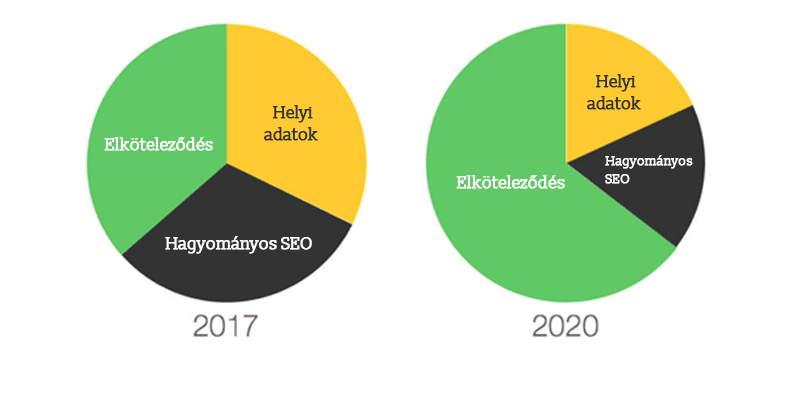
Engaging with online customers is not only beneficial for customer relationships, but can also be a signal to Google that can positively influence local search ranking results. David Mihm, founder of Tidings, believes that by 2020, engagement will be the differentiating local ranking factor.
-
Merging duplicate listings
Some business owners tend to overdo it and create multiple Google accounts, thinking that the more, the better! This is a typical case where one shoots oneself in the foot. So, if you also have multiple Google accounts for one company, quickly merge them, otherwise Google will rank your company lower.
-
Linking other sources to the website
Make sure your business has as many quality and credible local links as possible and ensure that information about your business – especially the company name, address and phone number – is accurate.
Published: · Updated: